Configuration
Introduction
MS²Rescore can be configured through the command line interface (CLI), the graphical user interface (GUI), or a JSON/TOML configuration file. The configuration file can be used to set options that are not available in the CLI or GUI, or to set default values for options that are available in the CLI or GUI.
If no configuration file is passed, or some options are not configured, the default values for these settings will be used. Options passed from the CLI and the GUI will override the configuration file. The full configuration is validated against a JSON Schema. A full example configuration file can be found in ms2rescore/package_data/config_default.json. An overview of all options can be found below.
Configuring input files
In the configuration file, input files can be specified as follows:
"psm_file": "path/to/psms.tsv",
"psm_file_type": "infer",
"spectrum_path": "path/to/spectra.mgf"
psm_file = "path/to/psms.tsv"
psm_file_type = "infer"
spectrum_path = "path/to/spectra.mgf"
See Input files for more information.
Parsing modification labels
MS²Rescore uses the HUPO-PSI standardized ProForma v2 notation to represent modified peptides in a string format. Unfortunately, most PSM file types coming from different proteomics search engines use a custom modification notation.
For example, a MaxQuant Modified sequence would be parsed as follows: _AM(ox)SIVMLSM_ 🠚
AM[ox]SIVMLSM. However, the label ox is not a resolvable modification, as it is not
present in any of the supported controlled vocabularies. Therefore, ox needs to be mapped to
U:Oxidation, where U denotes that the Unimod database is used
and Oxidation denotes the official Unimod name.
To correctly parse the various notations to ProForma, ms2rescore requires a configuration
modification_mapping which maps each specific search engine modification label to a valid
ProForma label.
Accepted ProForma modification labels in psm_utils (and by extension in
ms2rescore) are, in order of preference:
Type |
Long format example |
Short format example |
|---|---|---|
PSI-MOD accession |
MOD:00046 |
M:00046 |
PSI-MOD name |
MOD:O-phospho-L-serine |
M:O-phospho-L-serine |
Unimod accession |
UNIMOD:21 |
U:21 |
Unimod name |
UNIMOD:Phospho |
U:Phospho |
Formula |
Formula:HO3P |
/ |
Mass shift |
+79.96633052075 |
/ |
If a modification is not defined in any of the supported controlled vocabularies, preferably provide the formula instead of a mass shift, as the mass shift can always be calculated from the formula, but not vice-versa, and some feature generators (such as DeepLC) require the modification formula.
Formula modification labels can be defined with the Formula: prefix, followed by each atom
symbol and its count, denoting which atoms are added or removed by the modification. If no count is
provided, it is assumed to be 1. For example, Formula:HO3P is equivalent to Formula:H1O3P1.
For isotopes, prefix the atom symbol with the isotope number and place the entire block (isotope
number, atom symbol, and number of atoms) in square brackets. For example, the SILAC 13C(2) 15N(1)
label (UNIMOD:2088)
would be notated as Formula:C-2[13C2]N-1[15N], meaning that two C atoms are removed, two
13C atoms are added, one N atom is removed and one
15N atom is added.
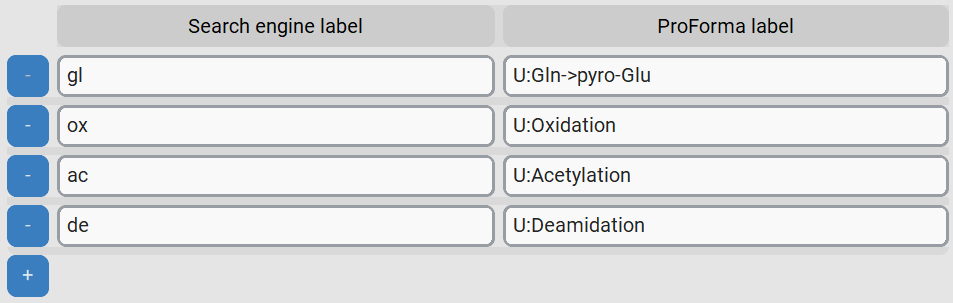
And example of the modification_mapping could be:
"modification_mapping": {
  "gl": "U:Gln->pyro-Glu",
  "ox": "U:Oxidation",
  "ac": "U:Acetylation",
  "de": "U:Deamidation"
}
[ms2rescore.modification_mapping]
"gl" = "Gln->pyro-Glu"
"ox" = "Oxidation"
"ac" = "Acetylation"
"de" = "Deamidation"
Adding fixed modifications
Some search engines, such as MaxQuant, do not report fixed modifications that were part of the search. To correctly rescore PSMs, fixed modifications that are not reported in the PSM file must be configured separately. For instance:
"fixed_modifications": {
  "U:Carbamidomethyl": ["C"]
}
[ms2rescore.fixed_modifications]
"U:Carbamidomethyl" = ["C"]

Fixed terminal modifications can be added by using the special labels N-term and C-term.
For example, to additionally add TMT6plex to the N-terminus and lysine residues, the following
configuration can be used:
"fixed_modifications": {
  "U:Carbamidomethyl": ["C"],
  "U:TMT6plex": ["N-term", "K"]
}
[ms2rescore.fixed_modifications]
"U:Carbamidomethyl" = ["C"]
"U:TMT6plex" = ["N-term", "K"]
Caution
Most search engines DO return fixed modifications as part of the modified peptide sequences.
In these cases, they must NOT be added to the fixed_modifications configuration.
Mapping PSMs to spectra
Essential for MS²Rescore to function correctly is linking the search engine PSMs to the original
spectra. As spectrum file converters and search engines often modify spectrum titles, two options
are available to map PSMs to spectra: spectrum_id_pattern and psm_id_pattern. Through these
two options, regular expression patterns can be defined that extract the same spectrum identifier
from the spectrum file and from the PSM file, respectively.
For example, if the spectrum file contains the following identifier in the MGF title field:
mzspec=20161213_NGHF_DBJ_SA_Exp3A_HeLa_1ug_7min_15000_02.raw: controllerType=0 controllerNumber=1 scan=2
and the PSM file contains the following identifier in the spectrum_id field:
20161213_NGHF_DBJ_SA_Exp3A_HeLa_1ug_7min_15000_02.raw.2.2
then the following patterns can be used to extract 2 from both identifiers:
"spectrum_id_pattern": ".*scan=(\\d+)$",
"psm_id_pattern": ".*\\..*\\.(.*)"
spectrum_id_pattern = '.*scan=(\d+)$'
psm_id_pattern = ".*\..*\.(.*)"
Both options should match the entire string and require a single capture group (denoted by the parentheses) to mark the section of the match that should be extracted.
Warning
Regular expression patterns often contain special characters that need to be escaped. For example,
the \ should be escaped with an additional \ in JSON, as is shown above. In TOML files,
the full regex can be wrapped in single quotes to avoid excaping.
Note
Find out more about regular expression patterns and try them on regex101.com. You can try out the above examples at https://regex101.com/r/VhBJRM/1 and https://regex101.com/r/JkT79a/1.
Selecting decoy PSMs
Usually, PSMs are already marked as target or decoy in the PSM file. When this is not the case,
it can usually be derived from the protein name. For example, if the protein name contains the
prefix DECOY_, the PSM is a decoy PSM. The following option can be used to define a regular
expression pattern that extracts the decoy status from the protein name:
"id_decoy_pattern": "DECOY_"
id_decoy_pattern = "DECOY_"
Multi-rank rescoring
Some search engines, such as MaxQuant, report multiple candidate PSMs for the same spectrum.
MS²Rescore can rescore multiple candidate PSMs per spectrum. This allows for lower-ranking
candidate PSMs to become the top-ranked PSM after rescoring. This behavior can be controlled with
the max_psm_rank_input option.
To ensure a correct FDR control after rescoring, MS²Rescore filters out lower-ranking PSMs before
final FDR calculation and writing the output files. To allow for lower-ranking PSMs to be included
in the final output - for instance, to consider chimeric spectra - the max_psm_rank_output
option can be used.
For example, to rescore the top 5 PSMs per spectrum and output the best PSM after rescoring, the following configuration can be used:
"max_psm_rank_input": 5
"max_psm_rank_output": 1
max_psm_rank_input = 5
max_psm_rank_output = 1
Configuring PSM generators
In addition to feature generators and rescoring engines, MS²Rescore supports optional PSM
generators, configured through the psm_generator option. A PSM generator adds candidate
PSMs to the input before feature generation and rescoring, for example to propose modifications
that explain an otherwise unresolved precursor mass shift.
Currently, Mumble is the only available PSM generator:
"psm_generator": {
  "mumble": {
    "mass_error": 0.02
  }
}
[ms2rescore.psm_generator.mumble]
mass_error = 0.02
Warning
Mumble is beta software: it is usable, but occasional errors can still occur, especially on unusual input. See Open modification searching with Mumble for the full configuration reference, integration details, and known limitations.
Configuring rescoring
MS²Rescore uses ristretto, a lean semi-supervised
rescoring implementation, as its rescoring engine. It can be configured with the rescoring
option, which exposes train_fdr and model (svm, the default, or the faster but less
powerful lda). On a difficult dataset, where the default 1% train_fdr doesn’t yield any
accepted PSMs for ristretto’s semi-supervised training, a higher value such as 10% can help:
"rescoring": {
  "train_fdr": 0.1
}
[ms2rescore.rescoring]
train_fdr = 0.1
Set rescoring to {} to use the defaults shown above.
See the ms2rescore.rescoring section for the module used to interface with ristretto.
All configuration options
MS²Rescore configuration
Properties
ms2rescore(object): General MS²Rescore settings. Cannot contain additional properties.feature_generators(object): Feature generators and their configurations. Default:{"basic": {}, "ms2pip": {"model": "HCD"}, "ms2": {}, "deeplc": {}}..*: Refer to #/definitions/feature_generator.basic: Refer to #/definitions/basic.ms2pip: Refer to #/definitions/ms2pip.deeplc: Refer to #/definitions/deeplc.im2deep: Refer to #/definitions/im2deep.ms2: Refer to #/definitions/ms2.
rescoring: Ristretto rescoring configuration. Set to {} to use the defaults below. Refer to #/definitions/rescoring. Default:{"train_fdr": 0.01, "model": "svm"}.psm_generator(object): PSM generator and their configuration..*: Refer to #/definitions/psm_generator.mumble: Refer to #/definitions/mumble.
config_file: Path to configuration file.One of
string
null
psm_file: Path to file with peptide-spectrum matches.One of
string
null
array
Items (string)
psm_file_type(string): PSM file type. By default inferred from file extension. Default:"infer".psm_reader_kwargs(object): Keyword arguments passed to the PSM reader. Default:{}.spectrum_path: Path to spectrum file or directory with spectrum files.One of
string
null
output_path: Path and root name for output files.One of
string
null
log_level(string): Logging level. Must be one of:["debug", "info", "warning", "error", "critical"].id_decoy_pattern: Regex pattern used to identify the decoy PSMs in identification file. Default:null.One of
string
null
spectrum_id_pattern: Regex pattern to extract index or scan number from spectrum file. Requires at least one capturing group. Default:"(.*)".One of
string
null
psm_id_pattern: Regex pattern to extract index or scan number from PSM file. Requires at least one capturing group. Default:"(.*)".One of
string
null
psm_id_rt_pattern: Regex pattern to extract retention time from PSM identifier. Requires at least one capturing group. Default:null.One of
string
null
psm_id_im_pattern: Regex pattern to extract ion mobility from PSM identifier. Requires at least one capturing group. Default:null.One of
string
null
max_psm_rank_input(number): Maximum rank of PSMs to use as input for rescoring. Minimum:1. Default:10.max_psm_rank_output(number): Maximum rank of PSMs to return after rescoring, before final FDR calculation. Minimum:1. Default:1.modification_mapping(object): Mapping of modification labels to each replacement label. Default:{}.fixed_modifications(object): Mapping of amino acids with fixed modifications to the modification name. Can contain additional properties. Default:{}.processes(number): Number of parallel processes to use; -1 for all available. Minimum:-1. Default:-1.rename_to_usi(boolean): Convert spectrum IDs to their universal spectrum identifier.write_flashlfq: Write results to a FlashLFQ-compatible file. Default:false.One of
boolean
null
write_report: Write an HTML report with various QC metrics and charts. Default:true.One of
boolean
null
report_fdr(number): FDR threshold used for reporting: console log identification counts, the HTML report’s identification stats/charts, and FlashLFQ output filtering. Independent of rescoring.train_fdr, which controls ristretto’s training instead. Minimum:0. Maximum:1. Default:0.01.disable_update_check: Disable the automatic update check. Default:false.One of
boolean
null
profile: Write a txt report using cProfile for profiling. Default:false.One of
boolean
null
fragmentation_model(string): Fragmentation model for spectrum annotation: cidhcd (a/b/y), etd (c/y/z), ethcd (a/b/c/y/z), or all (a/b/c/x/y/z). Must be one of:["cidhcd", "etd", "ethcd", "all"]. Default:"cidhcd".tolerance_value(number): Fragment mass tolerance value for spectrum annotation. Minimum:0. Default:20.0.tolerance_mode(string): Fragment mass tolerance mode for spectrum annotation. Must be one of:["ppm", "Da"]. Default:"ppm".
Definitions
feature_generator(object): Feature generator configuration. Can contain additional properties.rescoring(object): Ristretto rescoring configuration. Cannot contain additional properties.train_fdr(number): FDR threshold used during ristretto’s semi-supervised training. Minimum:0. Maximum:1. Default:0.01.model(string): Model used for ristretto’s semi-supervised rescoring: ‘svm’ (iterative Percolator-style SVM, default) or ‘lda’ (single-pass Fisher LDA, faster but less powerful on hard datasets). Must be one of:["svm", "lda"]. Default:"svm".
psm_generator(object): Additional PSM feature generator configuration. Can contain additional properties.basic(object): Basic feature generator configuration. Can contain additional properties. Refer to #/definitions/feature_generator.ms2pip(object): MS²PIP feature generator configuration. Can contain additional properties. Refer to #/definitions/feature_generator.model(string): MS²PIP model to use (see MS²PIP documentation). Default:"HCD".model_dir: Directory containing MS²PIP models. Default:null.One of
string
null
deeplc(object): DeepLC feature generator configuration. Can contain additional properties. Refer to #/definitions/feature_generator.calibration_set_size: Calibration set size. Default:0.15.One of
integer
number
ms2(object): MS2 spectrum-based feature generator configuration. Can contain additional properties. Refer to #/definitions/feature_generator.im2deep(object): Ion mobility feature generator configuration using IM2Deep. Can contain additional properties. Refer to #/definitions/feature_generator.reference_dataset: Path to IM2Deep reference dataset file. Defaults to IM2Deep’s own bundled reference dataset if not set. Default:null.One of
string
null
mumble(object): Mumble PSM generator configuration. Mumble proposes candidate Unimod modifications that explain each PSM’s precursor mass shift (open-modification-search style). Requires the optionalmumbledependency (pip install ms2rescore[mumble]). Mumble is still under active development (beta): review results and expect occasional errors, especially on unusual input. Can contain additional properties. Refer to #/definitions/psm_generator.aa_combinations(integer): Number of amino acid combinations to consider as an additional mass-shift explanation, on top of Unimod modifications. Requiresfasta_file. Increases runtime combinatorially; keep low. Default:0.combination_length(integer): Maximum number of modifications to combine per mass shift. Lower combination lengths are always included as well. Default:1.exclude_mutations(boolean): Exclude candidate modifications classified as amino acid substitutions. Default:false.fasta_file: Path to a FASTA file with protein sequences, used to validate amino acid combination candidates. Required ifaa_combinationsis greater than 0.One of
string
null
mass_error(number): Mass error tolerance in Da used to match a PSM’s mass shift to a candidate modification. Default:0.02.modification_file: Path to a restriction list of Unimod modifications to consider (TSV withunimod_id/name, and optionallyresidue, columns). Defaults to a curated subset bundled with Mumble. Ignored ifall_unimod_modificationsis true.One of
string
null
all_unimod_modifications(boolean): Consider all Unimod modifications instead of the restricted default/modification_filelist. Substantially increases runtime and the risk of false-positive candidate modifications. Default:false.